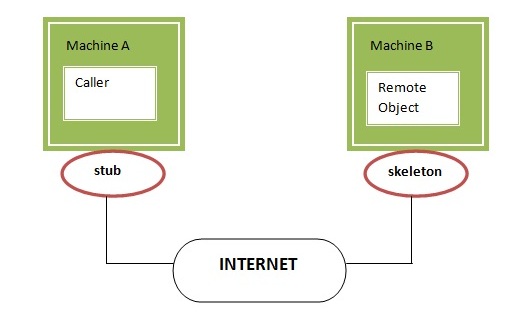
Writing your own RMI services can be a little difficult at first, so we'll start off
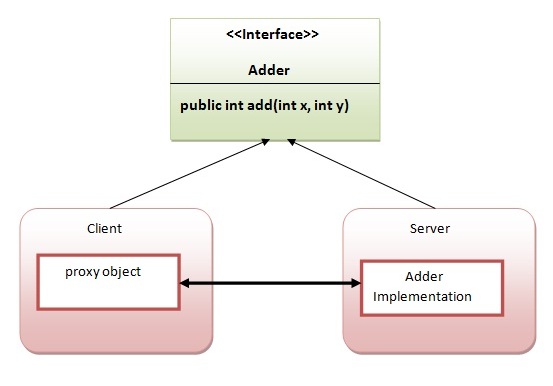
with an example which isn't too ambitious.In this example, we have followed all the 6 steps to create and run the
rmi application. The client application need only two files, remote
interface and client application. In the rmi application, both client
and server interacts with the remote interface. The client application
invokes methods on the
Showing posts with label Web Services. Show all posts
Wednesday, September 30, 2015
Getting Started with Simple RMI services
JAVA Remote Method Invocation (RMI)
Remote method invocation allows applications to call
object methods located remotely, sharing resources and processing load across systems.
Unlike other systems for remote execution which require that only simple data types or
defined structures be passed to and from methods, RMI allows any Java object type to be
used - even if the client or server has never encountered it before. RMI allows both
client and server to dynamically load new object types as required.
Tuesday, September 29, 2015
Study About Enterprise Java Beans (EJB) Introduction
Enterprise Java Beans (EJB) is a development architecture for building
highly scalable and robust enterprise level applications to be deployed
on J2EE compliant Application Server such as JBOSS, Web Logic etc.
A recent study by Java developer Raghu Kodali has shown that porting Sun's Java EE tutorial application RosterApp from EJB 2.1 to EJB 3.0 resulted in
Wednesday, August 26, 2015
Getting Started with Simple Apache Abdera Server
Apache Abdera provides an implementation of the IETF Atom Syndication
Format and Atom Publishing Protocol standards (RFC's 4287 and 5023). In this blog we're going to walk through how to build an Atom
Publishing Protocol service server sample using Abdera's concepts of Providers and
Collection Adapters. If you remember your AtomPub basics, you'll recall
that AtomPub services are organized in a hierarchical way such that we
have:
Labels:
abdera,
apache,
experience,
feed,
Java,
Web Services
Tuesday, May 26, 2015
Implement a service - order processing service using Axis2 Web Service and WSO2 Developer Studio (Eclipse)
Lets Build a Simple Order Process Service Sample System Based on the Previous Sample I run in the WSO2 Developer Studio So as usual in order run this Project we need Requirements if your a web services Developer then you no need to worry about extra Dependencies and other Downloads if your using WSO2 Developer Studio Because WSO2 Studio have all requirements for Develop web Services .I'm also new to Web Services Development so WSO2 Developer Studio reduce my other works except Service Development
Tuesday, May 19, 2015
Run Axis2 Web Service ServiceLifeCycle Sample in Java Using WSO2 Developer Studio (Eclipse)
Apache Axis2, the third generation Web services engine is more
efficient, more modular and more XML-oriented than its predecessor
Apache Axis. It is
carefully designed to support the easy addition of plug-in modules
that extend its functionality for features such as security and
increased reliability On the other hand, Eclipse is a project aiming to provide a universal
tool set for development. It is an open source IDE that is mostly
provided in Java, but the development language is independent and not
limited in any way. It is the most widely used IDE for most computer
languages, especially for JAVA.
Subscribe to:
Comments (Atom)