 This sample will give you a simple working experience with EJB client server . here I’m using netbeans as IDE and JBoss 5.1 as my EJB Container. and I created seperate client for Stateful an Stateless EJB sessions in order to make easy the development .We'll create a ejb module project named EJBTestServer.
Showing posts with label RMI. Show all posts
Showing posts with label RMI. Show all posts
Wednesday, October 7, 2015
Getting Started with Simple Remote EJB 3.X Server Sample
This sample will give you a simple working experience with EJB client server . here I’m using netbeans as IDE and JBoss 5.1 as my EJB Container. and I created seperate client for Stateful an Stateless EJB sessions in order to make easy the development .We'll create a ejb module project named EJBTestServer.
Wednesday, September 30, 2015
Getting Started with Simple RMI services
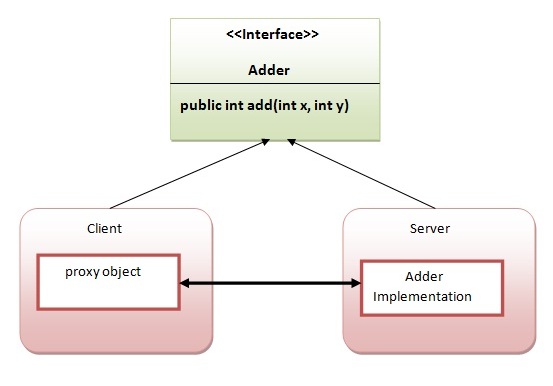
Writing your own RMI services can be a little difficult at first, so we'll start off
with an example which isn't too ambitious.In this example, we have followed all the 6 steps to create and run the
rmi application. The client application need only two files, remote
interface and client application. In the rmi application, both client
and server interacts with the remote interface. The client application
invokes methods on the
JAVA Remote Method Invocation (RMI)
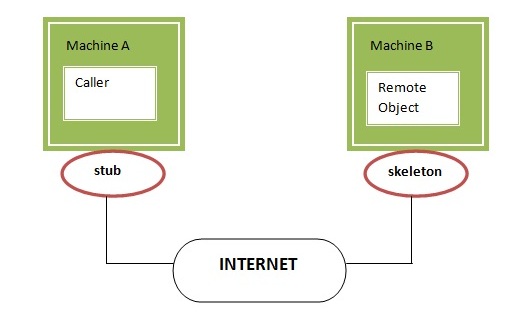
Remote method invocation allows applications to call
object methods located remotely, sharing resources and processing load across systems.
Unlike other systems for remote execution which require that only simple data types or
defined structures be passed to and from methods, RMI allows any Java object type to be
used - even if the client or server has never encountered it before. RMI allows both
client and server to dynamically load new object types as required.
Subscribe to:
Posts (Atom)